
Photo Collage Layout Ideas: How Many Photos and Which Arrangement
A simple way to choose a collage layout that tells your story instead of just filling a grid.
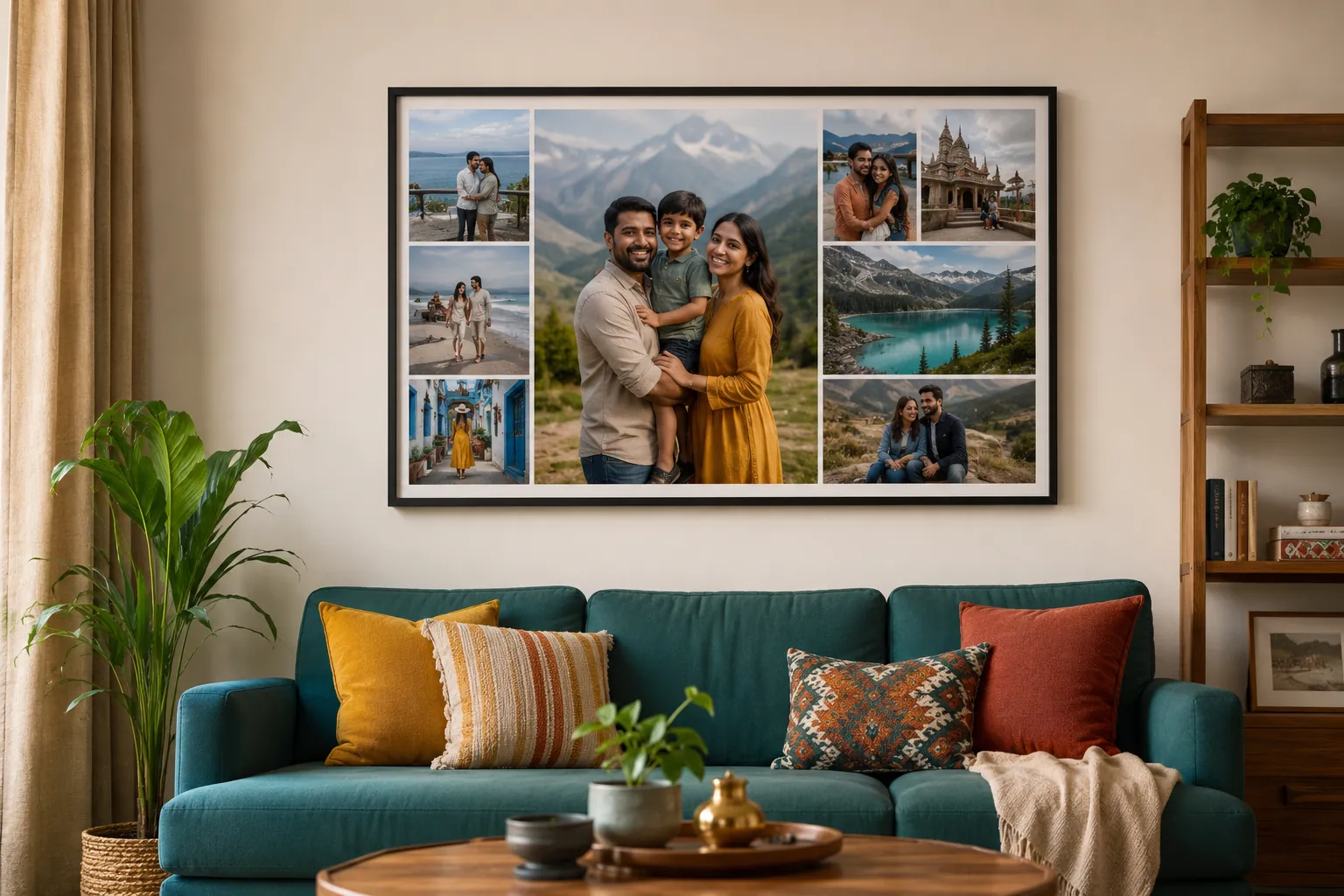
Two people can use the same six photos and end up with completely different results: one that feels like a story and one that feels like a crowded noticeboard. The difference is the photo collage layout, and specifically whether there is a structure underneath it. As composition guides put it, the most successful collages rely on a hidden framework that guides the eye through the images. This guide gives you that framework: the two basic structures, the design principles that make them work, and the mistakes to avoid.
If you have not settled the product details yet, our guide on how to put multiple photos in one frame covers finishes, sizes and ordering. This one is purely about the design.
Start with the story, then the structure
Before grids and sizes, decide what the collage is about: one wedding, one trip, one child over a year. A collage with a single clear theme reads as a story; a collage of unrelated photos reads as clutter no matter how neatly it is arranged. Once the theme is set, the structure almost chooses itself.
Grid or focal point: the two structures
Almost every layout is a version of two ideas, and the best designs pick one on purpose, as collage composition guides such as this one on the rules of collage composition explain:
- The grid: every photo gets equal space in clean rows and columns. Calm, ordered and fair, it suits photos of similar importance. A thick, even white border between images acts like a mini-frame and makes each shot pop.
- The focal point: one or two hero photos, clearly larger, with smaller images around them. It creates a centre of attention and suits a standout shot with supporting moments.
If one photo clearly stands out, use a focal point. If no single photo leads, use a grid. You can also combine them, a grid with one enlarged cell, for a balanced result.
Place the hero on a rule-of-thirds line
When you use a focal point, where you put it matters. Rather than dropping the hero photo dead centre, line it up along one of the rule-of-thirds lines, the imaginary lines that divide the design into thirds. This leaves negative space around it and makes the composition feel more dynamic than a centred block. The rule of thirds is the same principle photographers use to frame a shot, applied to the whole collage.
Balance, colour and spacing
A few design principles do the quiet work of making a collage look professional:
- Visual balance, not symmetry. The aim is a composition that feels stable and harmonious, which does not require both halves to match.
- Spread the bold photos. Distribute bright, busy images across the design rather than clustering them in one corner, and pair detailed photos with calmer ones so the eye has places to rest.
- Consistent colour and light. Photos with similar tone and brightness sit together naturally; a very dark photo beside a bright one looks like an error. Black-and-white is the easiest way to force cohesion.
- Even spacing and negative space. Keep the gaps between photos consistent, and leave a little breathing room around the edges so the collage does not feel like it is bursting its borders.
- Mixed orientations. Alternating portrait and landscape shots adds rhythm and stops the layout feeling mechanical.
These principles are drawn from collage design references such as this guide to balancing colours, sizes and spacing.
Let the photo count guide the shape
How many photos you use points to a layout. With a range of 2 to 9 photos:
- 2 to 3: side by side or a simple split, bold and clean.
- 4: a tidy two-by-two grid, or one hero with three small.
- 5 to 6: a focal-point layout with a clear main image and a row of supporting shots.
- 7 to 9: a full grid, best printed large so faces stay clear.
Match the layout shape to the wall
Layouts come in square, landscape and portrait shapes, and the right one depends on where it will hang. A landscape collage suits the wall above a sofa or bed; a portrait collage suits a narrow wall or beside a bookshelf; a square is the most flexible. We offer around 30 ready-made layouts across all three shapes, so you can match the design to the space.
Layout mistakes that make a collage look busy
Most cluttered collages share the same few errors:
- Too many photos for the size. Nine photos on a small print shrinks every face. Use fewer, or go larger.
- No focal point. If every photo is the same weight, the eye has nowhere to land. Let one lead.
- Clashing brightness or colour. Keep tone consistent across the set.
- Uneven spacing. Inconsistent gaps read as careless.
- Mixed themes. Stick to one story.
Fix those and even a simple grid looks considered.
See the real thing before you order
Even with the perfect plan, a layout can surprise you once your actual photos are in it. That is why you can preview your own collage, with your cropped and adjusted photos in place, in 3D and on your wall in AR before you order, so you catch any issue before it prints. Canvas and framed collages use pigment inks rated over 100 years, and collages start at Rs 263. Once you have a layout in mind, you can create a photo collage online, try a few layouts, and preview the result before you commit. For occasion-specific inspiration, see our wedding photo collage ideas, and there is more on the photo collage blog.
Frequently Asked Questions
What is the best layout for a photo collage?
How many photos look good in a collage?
Should all photos in a collage be the same size?
How do I keep a collage from looking cluttered?
People Also Ask
How do I arrange photos in a collage?
What makes a photo collage look professional?
Related articles
 Christmas
Christmas and New Year Personalised Photo Gift Guide
Skip the generic hampers this Christmas. Personalised photo gifts turn the year's best moments into presents people actually keep.
Read More Photo Frames
Family Photo Frame Ideas: Sizes, Layouts and Where to Hang
A family photo frame works when every face is easy to see from across the room. That depends on the photo, a size matched to the number of people, and the right wall.
Read More Birthday
Birthday Gift for Mom: Useful, Personal and Made from Her Own Photos
Mothers take most of the family photos and appear in the fewest. A collage made only of photos of her is a birthday gift she will not have seen coming.
Read More
Ready To Print Your Own Photos?
Turn your favourite memories into canvas prints, photo frames and photo collages — printed in India and delivered to your door.
Start Creating